The short answer
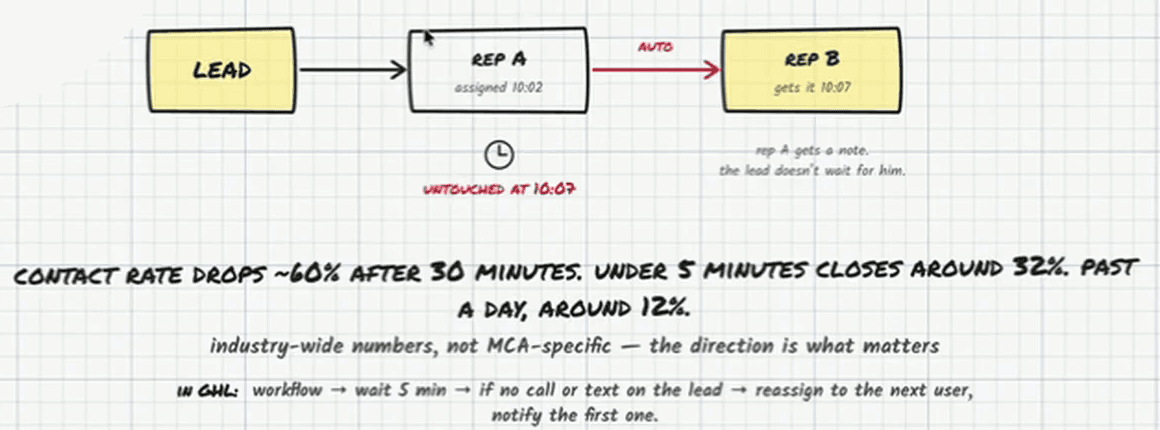
Set the CRM to reassign any lead with no call or text logged five minutes after it was assigned, and to notify the rep who lost it. No manager has to watch the queue, and a lead never waits on a rep who stepped out for lunch. The reason is speed: contact rates drop about 60% after 30 minutes, and industry-wide figures put the close rate around 32% for leads reached inside five minutes against about 12% for leads first reached after a day.
Every rep steps away. They go to the bathroom, take lunch, get stuck on a long call. None of that is a problem until a lead lands on their desk while they are gone and sits there, and on most floors nobody notices until it is cold. The fix is not a manager watching the queue. It is a rule that moves the lead on its own.
Why five minutes
| First contact | What the numbers say |
|---|---|
| Inside 5 minutes | Closes around 32% |
| After 30 minutes | Contact rate down about 60% |
| After a day | Around 12% |
These are industry-wide figures rather than MCA-specific ones, and the board says so; what matters is the direction, and the direction is steep. Alex’s own version is simpler: call the lead the moment they opt in and you get them on the phone about nine times in ten. Sixty seconds is the target, five minutes is the ceiling, and speed to lead has the fourteen-hour day that happens when there is no ceiling at all.
The workflow
- Trigger: a lead is assigned to a rep.
- Wait five minutes.
- Check: has a call or a text been logged on the lead? Opening the record does not count.
- If not, reassign it to the next user in the rotation.
- Notify the first rep that the lead moved, so it is visible rather than a mystery.
In GoHighLevel that is one workflow: wait five minutes, if no call or text on the lead, reassign to the next user and notify the first. Salesforce and HubSpot do the same with an assignment rule and a timed check. It sits behind the rule in CRM setup of assigning every lead to a named person on arrival, because a lead assigned to “the team” has nobody to take it away from.
Five minutes also makes the per-rep numbers honest. Once every stage carries a timestamp, time to first dial by rep shows who is losing leads to the rule, which is a coaching conversation rather than a guess.