The short answer
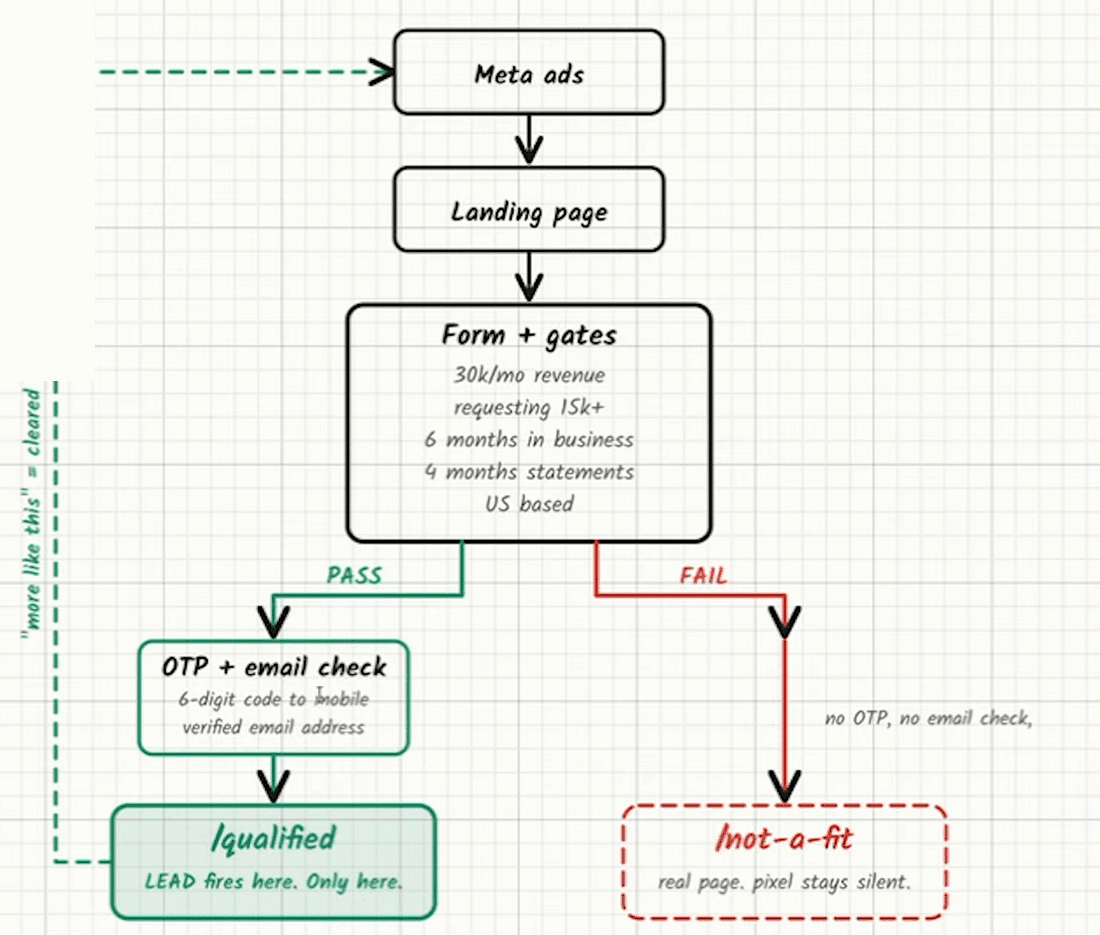
Every conversion event sent back to Meta is an instruction to find more people like that one. So the lead event fires only when a submission clears qualification — revenue, amount, time in business, verified phone — and a disqualified submission goes to a separate page the pixel never sees. Send the disqualified back and the campaign optimises, efficiently, towards merchants nobody can fund.
Tracking is the most overlooked part of running Meta ads for funding, and the part the large shops care about most. The components are standard — Meta pixel plus the Conversions API, and there is a ten-step build for putting them on a funding page — and the part that matters is a single rule about what gets sent.
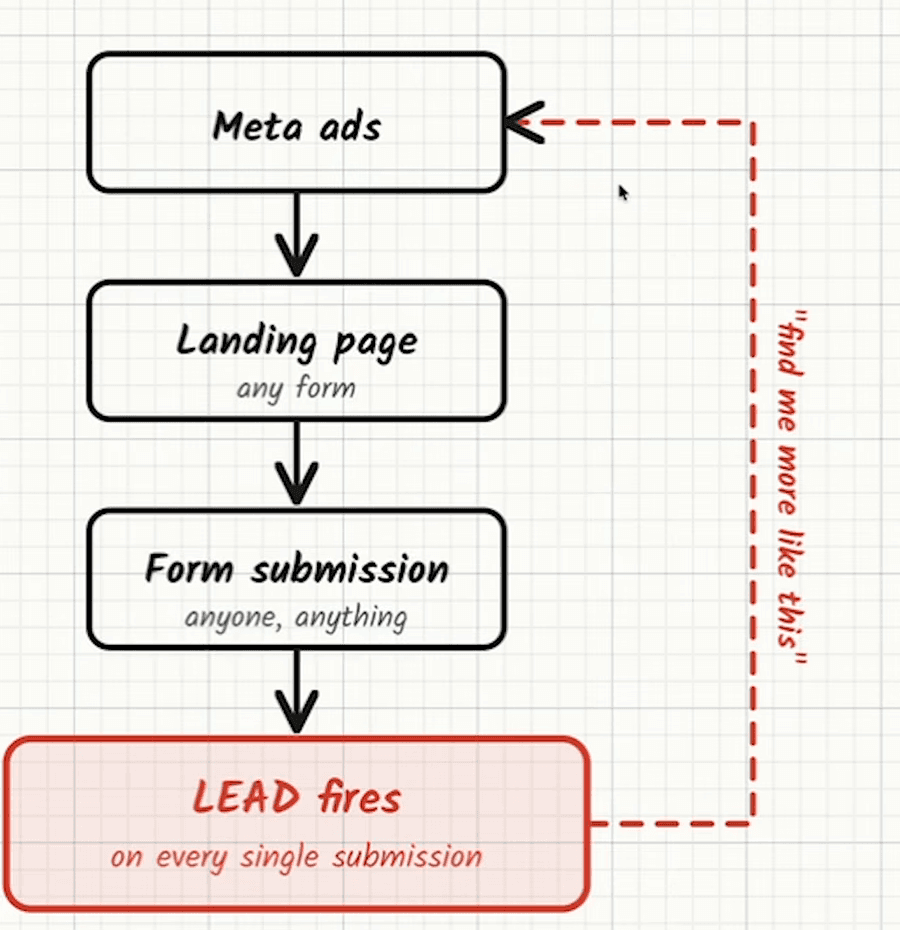
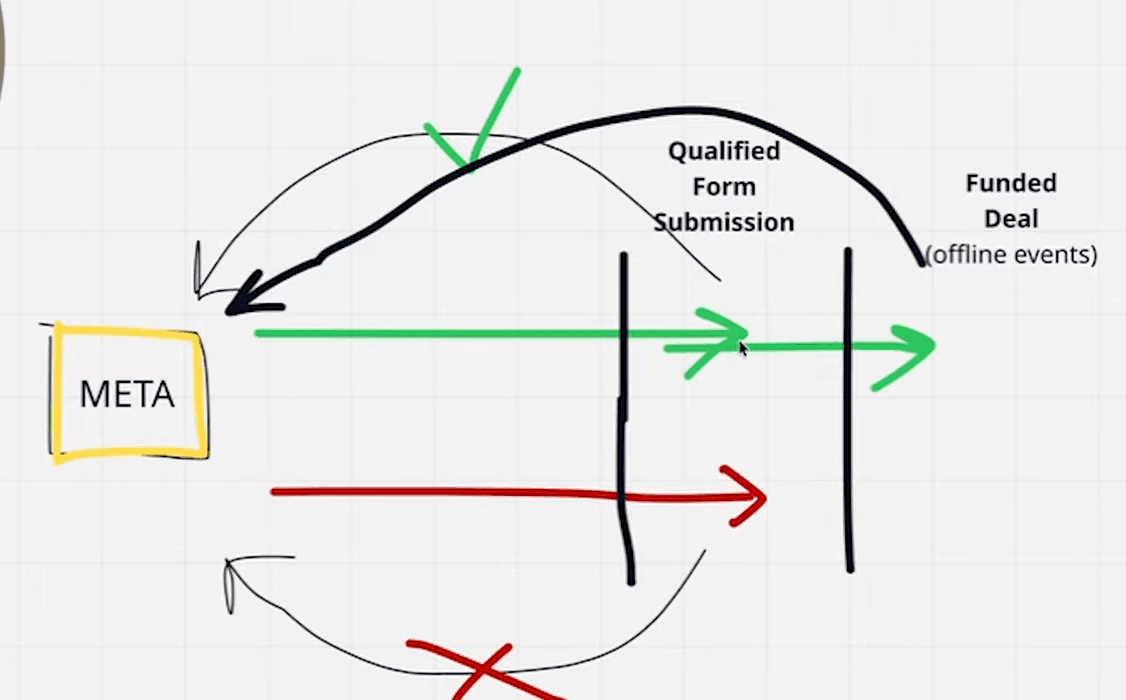
The fourth video puts the consequence plainly: a pixel firing on every submission is an instruction to find more people who submit forms, so Meta finds the cheapest possible way to get them. The leads that produces are startups, $5K-a-month businesses, merchants who are over-leveraged into third and fourth positions, merchants who have defaulted before, and spam. None of that is Meta failing. It is Meta doing exactly what it was asked.
The rule
- A submission that clears every gate fires the lead event. Meta reads it as “this is good, find more”.
- A submission that fails a gate is redirected to a separate page — an alternative offer is fine — where no lead event fires. You paid for that click, so the record can still be worked, or sold on where the form’s consent language covers it.
- That data never touches Meta. Not as a lead, not as a lesser event, not at all.
The reason is not subtle. Meta optimises for whatever it is told counts. Send it the $8K-a-month merchant as a conversion and it will find you more $8K merchants, cheaply and at volume, and the cost per lead will look excellent while the funded rate goes to nothing. The drift in lead quality that brokers blame on the platform is very often a pixel firing on a thank-you page that every submission reaches.
The third video puts the reason in one line: the pixel is not there to track your numbers, it is there to tell Meta which leads were good so it knows who to find next. That is also why a pixel seasoned on qualified merchants is the most valuable asset in the account, and why it is what eventually lets simple creative work.
The essentials video adds how long the instruction lasts: what Meta is fed now decides lead quality for roughly the next seven to ten days. A few days of disqualified submissions reaching the pixel keep costing you for a week or two after the redirect is fixed, and the right data raises quality just as steadily in the other direction, without dramatically raising the cost per lead.
What the setup needs
- Meta pixel plus the Conversions API on the landing page, both firing the same event with the same event ID so Meta keeps one copy rather than two.
- Qualification enforced on the page — revenue and amount bands, time in business, the one-time passcode — so “qualified” is a fact about the submission, not a judgement made later.
- Two destinations after submit: the qualified page, which fires the event, and the disqualified page, which does not.
- Immediate delivery to the CRM by API or webhook, so a qualified lead is called inside sixty seconds.
Own the data end to end. The shops that do well on this channel are the ones that can say, for a given ad, how many submissions it produced, how many qualified, and how many funded — and that starts with the pixel telling the truth about which is which.